
| Item | Location |
|---|---|
| Parallel Wire Apparatus | Set 13, Cabinet 1, Shelf 1 |
| Power Supply (red) |
Set-up Instructions
1. Plug wires in as shown in the photo below:
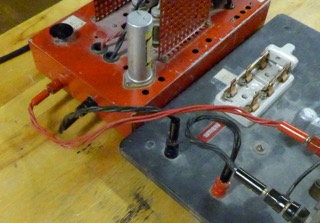
2. Turn on power supply - verify that indicator light turns on.
3. Test apparatus by throwing the switch.
Maintenance item: Verify wire connections to be sure that the wire has not disconnected itself.